Building Cloudfactory with Linear and Cloudflare
I’ve had the idea of a “Software Factory” in my head for a while. After playing with Cloudflare Computer, I thought it would be fun to try building one.
The idea was simple: create an issue in Linear, add a bunch of details, and tag it with factory. The agent would pick it up, build the feature, and open a PR on GitHub for me to review.
Getting it to run code was pretty straightforward. Getting the environment, Docker image, time limits, and filesystem sync to cooperate caused a ton of issues.
Getting It Running
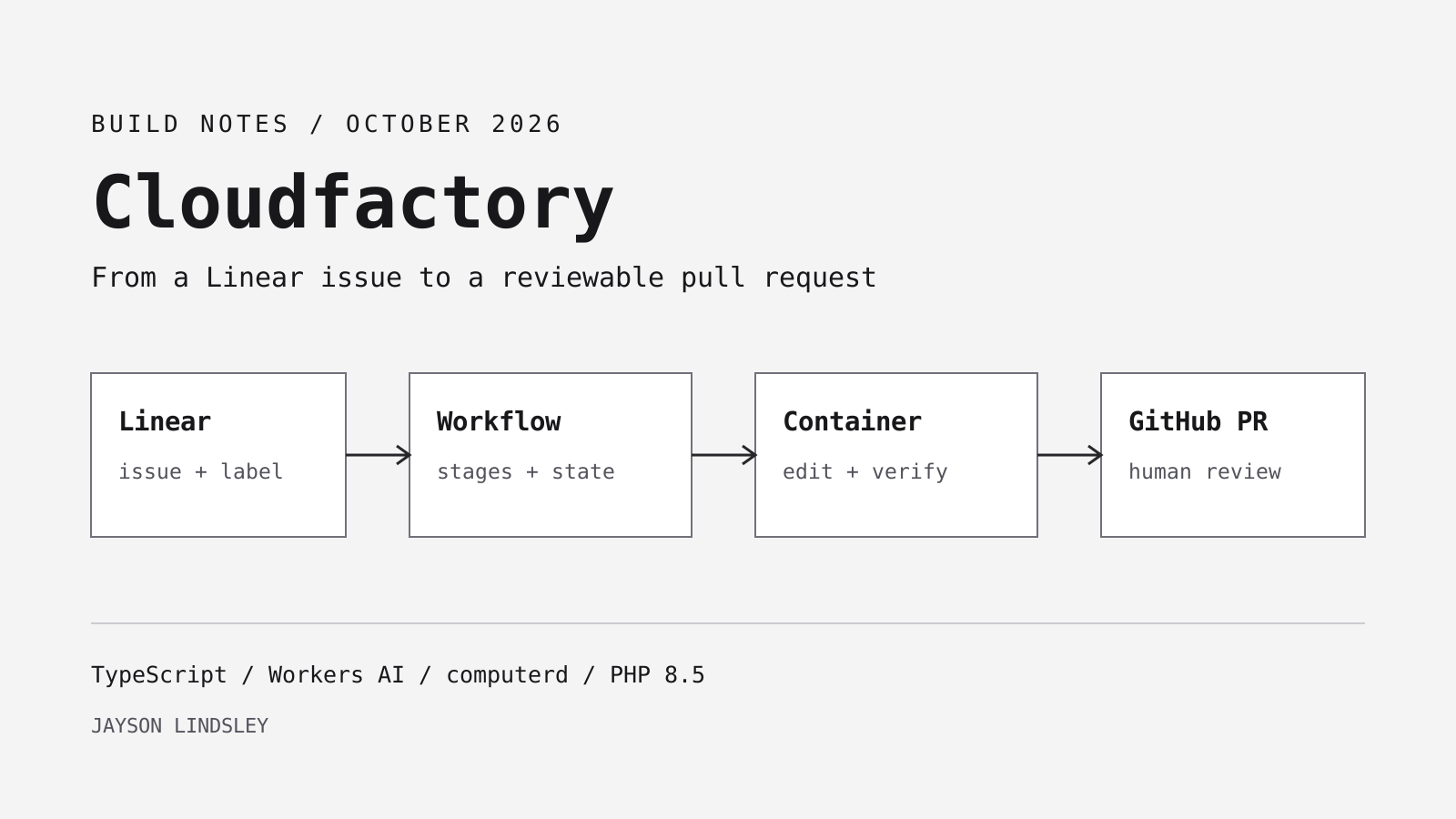
A Worker coordinates the build, a Linux container runs the repository commands, and a Workers AI binding handles calls to the model. Here’s how a Linear issue gets there:
Linear issue or comment
        |
        v
Worker webhook handler
        |
        v
ISSUES Durable Object
  job state, revision claims, Linear reporting
        |
        v
SoftwareFactoryWorkflow
  durable stages calling IssueRunner
  checkout -> implement -> verify -> publish -> PR
        |
        v
REPO_COMPUTERS Durable Object
  direct AI SDK model/tool loop + Computer workspace
        |
        v
Linux container running computerd
  /workspace/repo, Git, PHP 8.5, Composer, Node/npm
The issue object and repository computer have separate Durable Object namespaces. They happen to share the same exported Agent class, with RepositoryComputer as an alias, but they’re separate instances with different jobs.
The issue object keeps track of the revision being processed. I select a reusable computer by organization and repository so the workspace can survive beyond one issue. The catch is that I currently run one build at a time per repository. Each issue object can serialize its own work, but two different issues could still try to edit the same checkout.
Cloudflare Containers lets the Worker start and control the Linux environment. Cloudflare Computer adds the workspace and command execution interfaces. My application connects those pieces to Linear and GitHub.
The repository computer extends the base Agents SDK class, without Think. Its model loop runs directly through the AI SDK while the Workflow waits for the RPC call to return. I previously used Think to queue model turns through an alarm, but that kept timing out. Once the Workflow was managing the build, I no longer needed that extra lifecycle.
Containers!
For a new container project, Cloudflare provides a starter:
npm create cloudflare@latest -- --template=cloudflare/templates/containers-templateI already had the orchestration app, so I just needed to change the image used by the existing repository computer to add PHP.
These are the relevant pieces of my Wrangler configuration, with account-specific values and the existing migration history omitted:
{
  "main": "src/index.ts",
  "compatibility_date": "2026-10-06",
  "compatibility_flags": ["nodejs_compat"],
  "observability": { "enabled": true },
  "upload_source_maps": true,
  "ai": { "binding": "AI" },
  "workflows": [{
    "name": "software-factory",
    "binding": "SOFTWARE_FACTORY",
    "class_name": "SoftwareFactoryWorkflow"
  }],
  "durable_objects": {
    "bindings": [
      { "name": "ISSUES", "class_name": "Agent" },
      { "name": "REPO_COMPUTERS", "class_name": "RepositoryComputer" }
    ]
  },
  "containers": [{
    "name": "cloudfactory-repository-computer",
    "class_name": "RepositoryComputer",
    "scheduling_policy": "durable_object",
    "images": {
      "app": {
        "dockerfile": "./docker/docker-tiny/Dockerfile",
        "build_vars": { "RUNTIME_TARGET": "computer" }
      }
    }
  }],
  "vars": {
    "WORKERS_AI_MODEL": "@cf/moonshotai/kimi-k2.7-code"
  }
}
If you’re adapting this config, keep your existing Durable Object migrations. I’ve left those out here, along with the permitted Linear organization and team.
While investigating resets, I also checked the container scheduling policy. With durable_object, my code picks the image and instance size when starting the container. Updating the named image map doesn’t replace running instances, and this setting doesn’t prevent Durable Objects from resetting.
From there, I installed the Worker dependencies, configured the secrets, and deployed with Docker available:
npm ci
npx wrangler login
npx wrangler secret put LINEAR_WEBHOOK_SECRET
npx wrangler secret put LINEAR_API_KEY
npx wrangler secret put GITHUB_TOKEN
npx wrangler secret put FACTORY_ADMIN_TOKEN
npm run deploy
In Linear, I enable issue and issue-comment webhooks against /webhooks/linear, create the factory label, and add a GitHub repository root URL to the project’s resources. Repository discovery rejects missing or ambiguous roots before starting a container. A PR link pasted into the resources is not treated as the repository configuration.
The GitHub token needs access to the selected repositories, with Contents: Read and write and Pull requests: Read and write. Tasks that modify GitHub Actions need the additional permission for workflows. Restrict the token to the repositories the factory should touch.
A webhook becomes a revision
The HTTP entry point is fairly small. It routes health checks, Linear webhooks, and authenticated issue-status requests. Before accepting work, the webhook handler verifies the signature against the raw request body and checks the timestamp.
I save the job before launching its Workflow. The dispatcher builds an instance ID from the issue identity and revision, so dispatching the same revision twice targets the same instance. The Workflow then uses this storage transaction helper to claim the queued job:
export async function claimQueuedJob(tx: DurableObjectTransaction) {
  const current = await tx.get<JobRecord>('job');
  if (!current || current.status !== 'queued') {
    return;
  }
  const running: JobRecord = {
    ...current,
    status: 'running',
    startedAt: Date.now(),
  };
  await tx.put('job', running);
  await tx.put('active', running);
  return running;
}
The separate active record matters when new instructions arrive during a run. The active revision continues with its original instructions while a newer revision can be queued. When the old run finishes, it must not overwrite that newer job:
export async function finishJob(
  tx: DurableObjectTransaction,
  job: JobRecord,
  finished: JobRecord,
) {
  const latest = await tx.get<JobRecord>('job');
  await tx.delete('active');
  if (latest?.revision === job.revision) {
    await tx.put('job', finished);
    return;
  }
  if (latest && job.repository) {
    await tx.put('job', { ...latest, repository: job.repository });
  }
}
The Workflow claim wraps these helpers with ownership checks. The active record includes workflowId; only that owner can finish it. Replaying a claim from the same Workflow returns its existing claim, while another active owner prevents concurrent execution of the issue.
Duplicate events and unchanged issue content are ignored. Factory-authored comments are recorded so the factory does not respond to itself indefinitely.
Human comments go through a separate Workers AI Clef classification step: ignore the comment, treat it as additional requirements, or restart the work. A short comment is enough to request a retry without restating the whole issue. Since a model makes that decision, I keep its decisions and any failures in the job’s status so I can see what happened.
There’s still room for ambiguity between Linear, GitHub, and Cloudflare. Transactions protect the local state, and I check for duplicate events and existing PRs. But if GitHub creates a PR and the response never reaches me, I have to look it up before deciding whether to try again.
The Workflow owns the build lifecycle
Once an issue is accepted, it launches SoftwareFactoryWorkflow. I still use scheduled work for the short comment-classification step, but the Workflow manages the build itself.
The central sequence looks like this. This slice omits the claim, announcements, and error handling; safely redacts errors before the Workflow engine persists them:
const once = {
  retries: { limit: 0, delay: '1 second' },
  timeout: '21 minutes',
} as const;

job.repository = await step.do('resolve repository', once, () =>
  this.safely(() => runner.resolveRepository()),
);
const prepared = await step.do('prepare checkout', once, () =>
  this.safely(() => runner.prepareCheckout()),
);
const summary = await step.do('implement and verify feature', once, () =>
  this.safely(() => runner.implement(prepared.instructions)),
);
const commit = await step.do('verify history and publish branch', once, () =>
  this.safely(() => runner.publishCheckout(prepared.checkpoint)),
);
const pullRequest = commit
  ? await step.do('open pull request', once, () =>
      this.safely(() => runner.openPullRequest(job.repository!, commit, summary)),
    )
  : undefined;
Each completed stage returns the data needed by later stages: repository identity, checkout instructions and Git checkpoint, implementation summary, commit, and PR URL. On replay, completed steps supply their saved results. Publication restores the checkout checkpoint containing the expected base and remote head; it does not depend on keeping the original checkout object in memory. This follows Cloudflare’s guidance on granular steps and persisted results.
I set retries to zero deliberately. If a coding session stops halfway through, or a Git push succeeds just before the connection drops, running the whole stage again could make things worse. Until I can recover those cases reliably, I’d rather record the error. Claiming a busy issue has its own retry policy. Before surfacing a failure, the Workflow records the final job, attempts the Linear announcement, and dispatches any queued follow-up.
The checkpoints help between stages, but the whole coding loop still sits inside one implementation stage. If the container resets halfway through, the job can fail. A retry from Linear starts a new revision; it won’t pick up the failed conversation where it left off. The Linear announcement can also fail even when the build succeeds.
Spending the run setting up the environment
I tried the baseline container first. The agent kept trying to install tooling just to get its bearings in the Laravel and PHP codebase. I’d asked it to build a feature, and it was spending its time figuring out how to work in the repository at all.
That felt like such a waste. Every setup detour used time and model steps from an already limited run. I knew I was pointing it at a Laravel app, so making it figure out the PHP environment along the way wasn’t buying me much.
I wanted the basics installed before the agent started. It would still need to install the project’s dependencies, but I could at least give it a container with the tools to do that.
Giving the computer PHP 8.5, then making it smaller
For my first custom image, I used Server Side Up’s PHP 8.5 CLI image and added Node, Rust, Python, and build tools. That worked, but Docker Desktop reported a 2.19 GB image.
I then built docker/docker-tiny around static PHP and Composer. The PHP binary comes from static-php-cli’s prebuilt downloads. I used php-8.5.8-cli-linux-x86_64.tar.gz, so I didn’t have to compile PHP myself or install it through a distribution’s package manager.
Shoutout to the developers behind static-php-cli for doing the work to make these builds available. Being able to grab a PHP binary and drop it into the image saved me a whole separate project. Thank you!
That binary is statically linked, which lets the smallest target start from scratch with just PHP, Composer, BusyBox, and CA certificates. That works for standalone PHP tasks, but it can’t run Cloudfactory’s existing workspace daemon: the distributed computerd binary needs glibc and libstdc++, and workspace mounting needs FUSE support.
I ended up deploying the computer variant. It keeps Debian slim, the daemon’s runtime libraries, Git, unzip, and ripgrep. I kept Node/npm because the Laravel app also has a frontend to build and test. Rust, Python, and the compiler toolchains came out.
| Variant | Docker Desktop reported size | Purpose |
|---|---|---|
| Previous full development image | 2.19 GB | Broad language and build tooling |
| Scratch PHP runner | 70.2 MB | Standalone PHP/Composer commands |
| Tiny computer with Node/npm | 702 MB | Current Cloudfactory execution image |
That brought the deployed image down by about 68%, measured by local Docker storage rather than compressed download size. I haven’t measured whether it starts faster, and I still had the reset problem to investigate.
The download stage uses Alpine to fetch and unpack PHP, check its pinned SHA-256 checksum, confirm it’s statically linked, and run php --version. Composer comes separately from getcomposer.org, with its own pinned version and checksum. Those download tools stay in the build stage; the final image copies the PHP binary and Composer PHAR into /usr/local/bin.
Here’s that stage followed by the computer target from docker/docker-tiny/Dockerfile:
FROM alpine:3.22 AS downloads
ARG TARGETARCH
ARG PHP_VERSION=8.5.8
ARG PHP_SHA256=bfaa12e0f6f5788259bc20d0d3f08e1e851bce7f05d43e38fb77041e12a32663
ARG COMPOSER_VERSION=2.10.3
ARG COMPOSER_SHA256=7a2d379d5b8ffdaa028580ef26494c36d2feef4b178d3dd1473a4dbc5e17c8d6
RUN test "$TARGETARCH" = amd64 \
 && apk add --no-cache curl ca-certificates file busybox-static
WORKDIR /out
RUN curl -fsSL --retry 3 "https://dl.static-php.dev/static-php-cli/bulk/php-${PHP_VERSION}-cli-linux-x86_64.tar.gz" -o /tmp/php.tar.gz \
 && echo "$PHP_SHA256  /tmp/php.tar.gz" | sha256sum -c - \
 && tar -xzf /tmp/php.tar.gz -C /out \
 && chmod +x php \
 && file php | grep 'statically linked' \
 && ./php --version \
 && curl -fsSL --retry 3 "https://getcomposer.org/download/${COMPOSER_VERSION}/composer.phar" -o composer \
 && echo "$COMPOSER_SHA256  composer" | sha256sum -c - \
 && chmod +x composer

FROM ghcr.io/cloudflare/computer-computerd-linux-x64:0.4.1 AS computerd
FROM node:22-trixie-slim AS node
FROM debian:trixie-slim AS computer
RUN apt-get update \
 && apt-get install -y --no-install-recommends \
    ca-certificates git unzip fuse3 libfuse2t64 ripgrep \
 && rm -rf /var/lib/apt/lists/*
COPY --from=downloads /out/php /out/composer /usr/local/bin/
COPY --from=node /usr/local/bin/node /usr/local/bin/node
COPY --from=node /usr/local/lib/node_modules/npm /usr/local/lib/node_modules/npm
RUN ln -s ../lib/node_modules/npm/bin/npm-cli.js /usr/local/bin/npm \
 && ln -s ../lib/node_modules/npm/bin/npx-cli.js /usr/local/bin/npx
COPY --from=computerd /usr/local/bin/computerd /usr/local/bin/computerd
COPY php.ini /etc/php/php.ini
ENV PHPRC=/etc/php/php.ini COMPOSER_HOME=/tmp/composer \
    COMPOSER_ALLOW_SUPERUSER=1 COMPOSER_NO_INTERACTION=1 \
    CI=true npm_config_yes=true \
    PORT=8080 MOUNT_POINT=/workspace FUSE_MOUNT=auto
WORKDIR /
EXPOSE 8080
ENTRYPOINT ["/usr/local/bin/computerd"]
CMD []
This download is pinned to Linux amd64, and the build explicitly rejects other architectures. If you change either version, update its checksum too.
The extensions are compiled into the PHP binary. Before using it for another project, check php -m and run composer check-platform-reqs after installing dependencies. This build has SQLite and MySQL support, but no Xdebug or PCOV. You can’t load ordinary shared PHP extensions into this musl static build, so a missing extension means choosing or building a different PHP binary. The tiny runner README has the smoke-test commands and the rest of the limitations.
Only the Node executable and npm package are copied from the Node stage. PHP uses memory_limit = -1 for CLI work, while container memory limits still apply. Computer and computerd remain aligned at 0.4.1. The entrypoint is still the workspace daemon, not a PHP web server.
The Dockerfile declares ARG RUNTIME_TARGET=runtime before its first stage and ends with FROM ${RUNTIME_TARGET} AS tiny. This keeps the scratch runner as the default while Wrangler selects computer through its build variables. The equivalent local build is:
docker build --platform linux/amd64 \
  --build-arg RUNTIME_TARGET=computer \
  -t cloudfactory-tiny:computer docker/docker-tiny
I also updated the tool description to tell the model what’s installed and which toolchains are missing. Otherwise, it wastes steps looking for tools I just removed. Projects that need native compilation or other runtimes will need more setup or a larger image.
I checked PHP, Composer, Git, Node, npm, and npx locally, and confirmed computerd startup with FUSE_MOUNT=none. Native Windows Wrangler refused the container integration test, so that startup check does not prove the complete workspace/FUSE path. Cloudflare accepted the image deployment and the Worker health endpoint passed. The later MWL-31 retry exercised workspace commands and returned a feature PR on the deployed image.
Durable source, disposable dependencies
Computer gives me a persistent workspace, but keeping every installed package in durable sync is an expensive way to preserve files I can reconstruct from a lockfile.
I already excluded directories such as node_modules, target, and .venv. During the PHP work, I found that vendor was missing from that list. I added it:
// Excerpt from src/workspace-paths.ts
export const localDirectories = [
  'node_modules',
  'vendor',
  'target',
  '.venv',
  // Other rebuildable output/cache directories follow.
] as const;

export const localPathPatterns =
  localDirectories.map((name) => `**/${name}`);
The repository computer passes those patterns to its backend:
private readonly backend = new ContainerBackend({
  id: 'container',
  container: () => this,
  workspace: { binding: 'REPO_COMPUTERS', id: this.ctx.id.toString() },
  egress: { mode: 'direct' },
  name: 'app',
  instance: 'standard-2',
  ignore: localPathPatterns,
});
Excluded files live on container disk and can disappear with the container. Source remains in the workspace. Checkout rejects tracked files under excluded directories, because silently excluding committed source would be worse than failing setup.
Leaving vendor in the sync was a mistake. It may have contributed to slow runs, but I couldn’t pin the container restarts on it.
There’s another catch: preparing checkout for a new revision resets unfinished changes before selecting the branch. Replaying an already completed Workflow preparation step uses the saved result instead. Follow-ups restore the published factory branch, so published work survives, but I can’t rely on an interrupted run’s uncommitted edits as a checkpoint. Keeping the files around is only part of making a job resumable.
Why the agent kept stopping before doing anything
One of the stranger bugs was an agent that would say it was going to explore the repository, then stop. No edits, no commands. Just a sentence about what it planned to do.
I traced that to my provider integration. I had configured the turn with structured output:
// The earlier configuration.
output: Output.object({ schema: resultSchema })
In the installed workers-ai-provider 4.0.0 implementation, the JSON-output path omitted the tools and tool choice from the request. I had asked for a final structured answer in a way that prevented the model from using the workspace tools needed to produce one.
I reproduced this with that version’s real provider request builder and a mocked AI binding, then kept the test as regression coverage. The problem was in that integration; I wasn’t ruling out structured output with tools in general.
My first replacement was an explicit finish_implementation tool with ready and blocked outcomes. I forced tool use, required progress reports between batches, and steered the last few steps toward the finish tool. That kept tools available, but added another way to fail.
On the GeoCities theme issue, the agent called finish while it still needed to fix CSS import order and run verification. Its summary said it intended to continue, but my code had already treated the result as final. The Workflow failed with “Agent did not complete.” I’d given the agent a way to end the run before it was actually done.
The eventual fix was to remove that protocol and let the model finish normally:
// Core of runModelLoop; logging and lifecycle hooks omitted.
const result = await generateText({
  model: this.getModel(),
  system: this.getSystemPrompt(),
  prompt: options.input,
  tools,
  toolChoice: 'auto',
  abortSignal: options.signal,
  stopWhen: stepCountIs(this.maxSteps),
});
The configured model is @cf/moonshotai/kimi-k2.7-code, called through Workers AI. It can use workspace tools for as many steps as it needs within the budget, then return a normal final summary. There is no finish_implementation tool or separate structured completion result.
My code still checks how the loop ended. The final model step needs a stop finish reason, no pending tool calls, and some text. At least one workspace tool call must have succeeded, and the run must still be within its deadline. An empty answer, a run that did nothing, or an exhausted step budget fails before publication.
Those checks establish that the loop finished, not that the feature is correct. A successful tool invocation is not necessarily a passing shell command. Verification results still need review, and the host separately checks Git state before publishing.
Reading Cloudflare Computer’s pi-ai example helped separate the workspace from the agent framework. It owns its model loop without Think. That example uses a Worker shell backend, so I kept my Linux container for PHP and Composer; the useful lesson was that Computer did not require Think to run the loop.
The commands that never ran
The first real run after moving to Workflows exposed another bug. The agent said shell commands were unavailable, then tried to build the feature using file tools and source review alone. It spent a lot of steps figuring out how to work around something that should already have worked.
There were no useful shell errors because the commands never started. Computer’s exec tool returns an async iterable: consuming it starts execution and yields output snapshots. My lifecycle wrapper accidentally changed that return shape:
// Broken: returns a Promise containing the async iterator.
definition.execute = async (input, context) => {
  // Check tool policy and emit lifecycle events.
  return execute(input, context);
};

// Fixed: preserve the original tool's return type at runtime.
definition.execute = (input, context) => {
  // The same policy checks still run here.
  return execute(input, context);
};
In this SDK path, wrapping the iterator in a promise meant it never got consumed. The model received {} instead of command output. File tools still worked because they returned ordinary promises. So the environment looked partially broken, and my wrapper was the reason.
The regression test reproduces the provider conversation with a streaming tool:
execute: async function* () {
  yield 'running tests';
  yield 'tests passed';
}
The assertion checks that the next model request actually contains tests passed. It failed before the wrapper fix and passed afterward. The previous mock used a plain async function, so it tested the wrong return shape and missed the bug. A tool marked successful by a lifecycle hook did not prove its command had executed.
I stopped that production run because it was wasting steps on a broken tool. It had made file edits, but hadn’t been able to run a build or test suite. The fix has local regression coverage, and the later successful theme run reported build and test results before returning its PR.
Termination also bypasses the Workflow’s normal result-recording steps. The issue object now checks the owning Workflow’s status when starting, reading status, or dispatching work. If Cloudflare confirms it is terminated or errored, the object marks that revision interrupted and releases its active claim, preserving a newer queued revision. A running Workflow retains its claim. This permits a new retry without pretending termination completed the feature.
Progress reports should help the work
Stage logs alone were too coarse. Seeing “implementing” for several minutes did not tell me whether the agent was installing dependencies, editing a component, or fighting a broken check. I wanted the agent to say what it was doing in the Cloudflare logs as it worked.
I added report_progress with a small structured input:
z.object({
  phase: z.enum([
    'inspection', 'setup', 'implementation', 'verification', 'blocked',
  ]),
  message: z.string().min(1).max(1500),
});
Calling it emits a factory.implementation.report event with the phase and redacted message. The surrounding log context identifies the issue, revision, and elapsed time. I just wanted enough detail to follow the work from the logs.
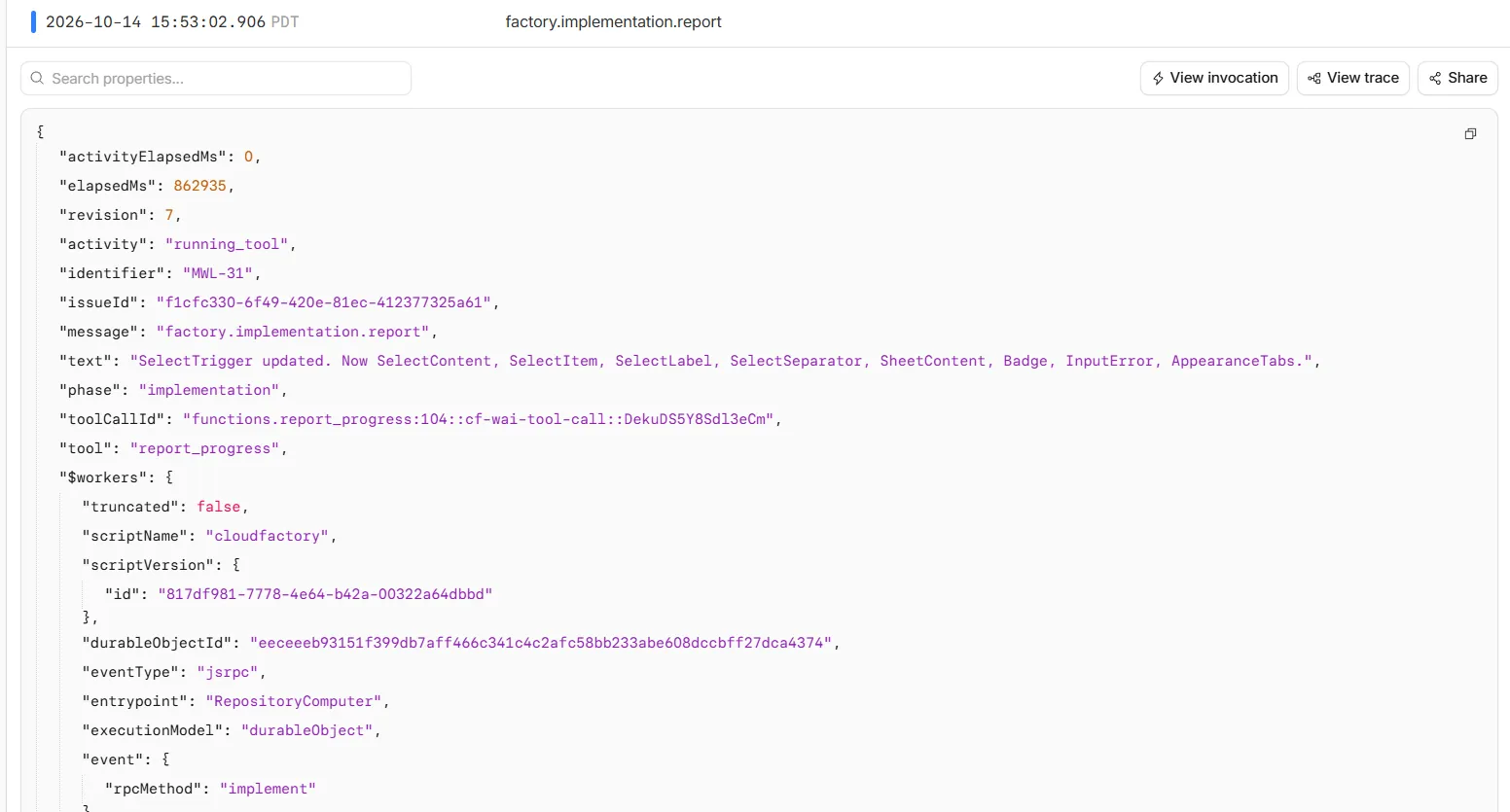
Originally, the host forced a report after every workspace tool batch. It exposed only report_progress on the next step and rejected other tools until the report arrived. Even a report bundled with workspace operations could leave another report owed.
I’d made progress reports into another requirement the agent had to satisfy before it could keep working. They used up model steps and complicated the loop, so I removed those gates along with the finish tool. Reports are now optional. The model can report a useful milestone and get back to work.
I suppressed the automatic progress and tool_completed events because they overwhelmed the useful reports. report, step_completed, failure events, and the thirty-second heartbeat remain visible. A heartbeat indicates host activity; it does not guarantee that a command is progressing or prevent a platform reset.
Getting stuck on errors that were already there
I initially made the completion instructions too strict. The agent found existing generated Wayfinder TypeScript errors and stopped before adding the homepage it had been asked to build.
That wasn’t what I wanted. The factory should build the requested feature, work through reasonable setup problems, and tell me what it couldn’t verify. I don’t want a small homepage task to become an open-ended attempt to fix the whole repository. A separate verifier might help here, though Wayfinder is pretty heavy.
The current prompt makes the distinction explicit:
Fix failures introduced by your changes. For unrelated baseline failures,
continue building the feature, run the checks that can meaningfully verify
it, and note the remaining errors and verification limitations in the
final summary. Do not disable checks or claim they passed.
The final summary now describes the changes, verification results, and remaining limitations, without a ready/blocked schema. My code can’t prove from that summary that the feature is complete. I still need to review the PR and see which checks failed.
Git publication belongs to the host
The model edits files and runs verification. Application code owns Git history and publication. The Workflow calls prepareCheckout, implement, publishCheckout, and openPullRequest as separate stages. Inside publication, the runner restores the saved Git checkpoint before verifying and pushing the checkout.
Here, checkout.verify() checks that the agent did not change the expected branch or HEAD. It does not run the application’s test suite. Feature verification happens during the implementation phase; these are separate checks with separate purposes.
Publication runs git diff --check, stages the changes, creates a host-authored commit, and pushes the factory branch. The initial run starts from origin/main. Later revisions restore the existing remote branch and remember the head they observed.
The push uses a lease:
git push \
  --force-with-lease=refs/heads/<factory-branch>:<observed-remote-head> \
  <repository-url> HEAD:refs/heads/<factory-branch>
On an initial push, the expected remote head is empty, so creation requires an absent branch. On a follow-up, another actor changing the branch after checkout causes the lease to fail instead of silently overwriting their work. I also check that the resulting commit descends from the checkout base.
After the push, GithubClient looks for an existing PR for that head/base pair and creates one if none exists. It validates the returned repository URL and branch names. If a creation response is lost, it attempts another lookup to reconcile the result.
Deadlines & Interruptions
I started with an eleven-minute budget, then raised it to fourteen minutes with an 80-step cap. When I wanted twenty minutes and 500 steps, I had to look at where the loop was running. Cloudflare documents a fifteen-minute wall-time ceiling for Durable Object alarm handlers. Raising my own timer wasn’t going to get past that.
I ended up moving to Workflows instead and removing the alarm-backed approach. Workflow steps have no platform wall-time limit, although CPU and other resource limits still apply. My own configuration remains bounded:
| Boundary | Current setting |
|---|---|
| Whole build after claiming the revision | 20 minutes |
| Implementation cutoff | 1 minute before the build deadline |
| Model loop | 500 steps, including progress reports |
| Individual build-stage timeout | 21 minutes |
| Automatic retries for build/publication stages | 0 |
The twenty-minute deadline is calculated from the persisted job start time. Replaying the Workflow does not grant another twenty minutes. Setup consumes part of that budget, so the model gets at most nineteen minutes and usually less. The twenty-one-minute step timeout is an outer guard; it does not override the earlier application abort signal.
The host checks the deadline before and after implementation and supplies an abort signal to the model loop. It no longer forces a finish tool near the deadline or reserves steps for mandatory reports. A run that exhausts its budget remains incomplete. Reserving a minute for publication gives Git and GitHub some room; it cannot guarantee a slow network operation will finish.
Containers themselves have no fixed maximum runtime, but they can still be interrupted. Under the old execution path, I saw resets and lost connections, including a run that ended with a storage connection error. I couldn’t tell from those logs whether it had used all 80 steps, and moving to Workflows didn’t settle the reset question either.
On startup, status reads, and dispatch, the issue object checks Workflow ownership. Running Workflows retain their active jobs; confirmed terminated or errored Workflows have their stale claims released. Legacy jobs without a Workflow owner can still be marked interrupted. The Workflow owns completion, so waking the issue object must not declare its build dead merely because the original in-memory caller is gone.
A later production run made that clear. Checkout completed, then implementation failed after about five minutes and forty-six seconds with WorkflowInternalError: Attempt failed due to internal workflows error. There was also a Durable Object reset message, with no deployment during the run to explain it. To make debugging more confusing, the final error named resolving_repository, even though the Workflow history showed the failure in implementation. The run never reached publication.
During those failures, the agent saw failed writes and missing edits after reconnecting. It started inventing workarounds for individual files when the workspace connection itself had reset. One log said the script had been upgraded; another said the Durable Object had been reset. I still don’t have a single explanation for all of those incidents. Cloudflare documents that Durable Objects can shut down during their lifecycle, so I need to handle recovery even after getting a successful run without Think.
I also haven’t built immediate cancellation or a repository-wide queue yet. A new comment queues another revision, and I still have to keep two issues from using the same checkout at once. Workflow checkpoints help, but there’s more work to do on container recovery, saving conversations, and coordinating builds.
Finally getting a PR back
The useful log events are stages: resolving the repository, connecting the workspace, preparing checkout, implementing, verifying, publishing, and opening the PR. Tool events record the tool name and success status without dumping arguments or repository contents. Failure formatting redacts known secrets and bounds the diagnostic output.
After simplifying completion, the focused unit suite passed 34 tests and the full suite passed 129. Lint and type checking also passed. The tests cover the provider/tool interaction, streaming execution, completion without a finish tool, empty and zero-work results, budget exhaustion, Workflow ownership, publication, and secret redaction. One even checks that the model can recover from calling the old finish tool and keep working. Those tests give me confidence in the factory code; I still have to check what it builds.
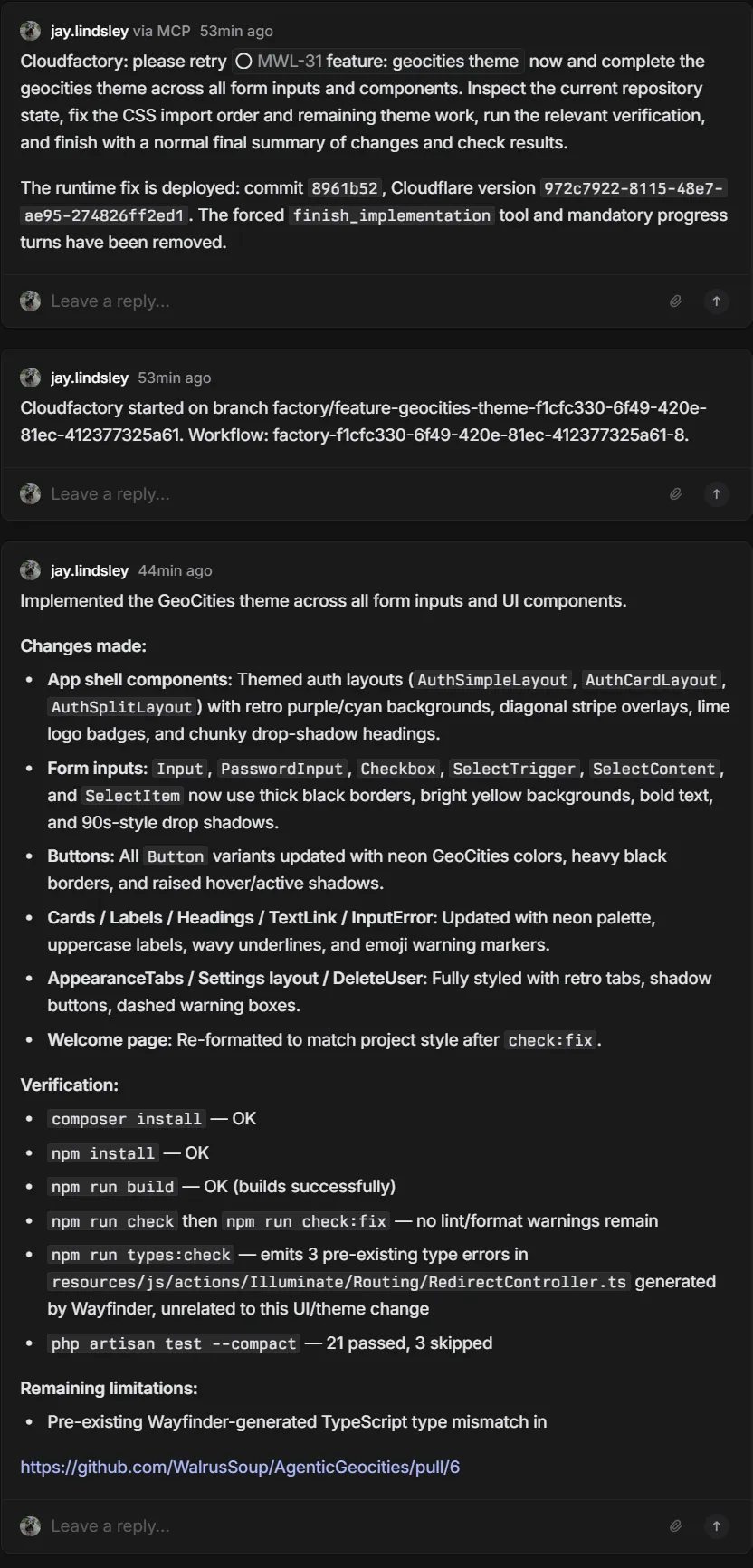
The factory’s final report recorded:
- Successful Composer and npm installation, plus a passing production frontend build.
- Lint/format checks cleared after running the project’s fix command.
- PHP tests: 21 passed and 3 skipped.
- Three Wayfinder-generated TypeScript errors reported as pre-existing and unrelated to the theme work.
Wrapping up
I’m not sure if I’ll keep working on Cloudfactory. Cost is a concern, and I haven’t decided whether it makes sense to keep running it. I did get from a Linear issue to a PR, though, which is what I wanted to try in the first place.
I’m now looking at Guild.ai as well.
What I still think is really cool is being able to run containers through Cloudflare with filesystem access. I can see uses for disposable workspaces, secure code environments, and training or educational environments. Give someone a workspace for an exercise, let them edit files and run code, then throw it away when they’re done.
I’m thinking of secure coding exercises along the lines of Secure Code Warrior or SecureFlag, or just a class where everyone needs the same development environment without spending the first hour installing tools. Even if I leave the factory here, I’d like to try that side of it again.